The board measures. The phone app stores what it measured, works out a hydration index and shows it. Between the two sits one binary protocol. It defines what a sample frame looks like and which measurement sits on which channel number.
The app does not know which microcontroller sent a frame. It knows that channel 0x0001 is impedance in milliohms. That is what lets the board and the app be worked on separately.
From skin to phone
Inner pair senses
front end
INTB: sample ready
sends
does the maths
The measurement starts at four snaps on an elastic band. The outer pair pushes a small alternating current of about 40 kHz through the upper arm. The inner pair measures the voltage that current produces. Splitting the two jobs keeps the resistance where the metal meets the skin out of the voltage reading, which is the part that makes a simple two-electrode measurement unreliable.
The MAX30001 does that analogue work. It needs a steady clock to do it, so the board gives it its own 32.768 kHz oscillator rather than borrowing one from the microcontroller. There is a footprint for the backup route from the controller, but it is deliberately left unpopulated.
The MAX30001 does not push data anywhere on its own. It raises a single interrupt line, INTB, to say a sample is ready. The controller sees that line go low and reads the result over SPI, four wires running at 1 MHz. Slow, on purpose: the readings arrive at 64 per second, so there is no reason to run the bus fast while we are still finding bugs on it.
The SPI conversation
Every exchange with the MAX30001 is the same shape: thirty-two bits, no more and no less. One command byte, then three bytes of data. The chip’s registers are all 24 bits wide, so three bytes is exactly one register.
The command byte is the seven-bit register address shifted up by one, and the bit left over at the bottom says whether this is a read or a write. To read the status register at address 0x01, the controller sends 0x03. To write it, 0x02. Reading means sending the command and then three bytes of nothing in particular, while the chip clocks its answer back on the other wire.
Thirty-two bits, always. The registers are 24 bits wide, so three bytes is exactly one register.
The controller does not sit and ask whether a sample is ready. That is what INTB is for. When the line goes low the controller reads the status register to find out why, because there are several reasons it could be. Bit 19 means the bioimpedance FIFO has filled to its threshold and there is something worth collecting.
Then it reads the FIFO. Each sample that comes back carries a three-bit tag in its lowest bits, and the tag is the useful part: valid, out of range, the last sample available, the FIFO is empty, the FIFO overflowed. The measurement says how far it should be trusted, in the same eight bits that carry it. That idea survives all the way to the phone, where each record carries its own flags.
Reading the FIFO is not free. Every read moves the pointer on and consumes a sample, so it is the one register the bring-up tooling must not dump in a loop the way it dumps configuration registers. That distinction is written into the driver rather than left to whoever is debugging at the time.
What Bluetooth Low Energy is doing here
The controller does not send a reading the moment it has one. At 64 samples a second, one Bluetooth packet per reading would flatten the battery and swamp the phone for no benefit.
Instead the board offers one Bluetooth service with a handful of characteristics, which are the individual values a client can interact with. Some are read once on connection, like the device information and the list of sensors the board actually has. Two are written to, for asking the board to replay history. The rest are notify characteristics: the phone subscribes once, and from then on the board pushes to it whenever it has something.
Live measurements go out on one of those, batched. Several channels are collected into a single frame with one timestamp, and frames go out about sixteen times a second. The phone subscribes and then simply waits.
One frame, byte by byte
Here is a frame from the first prototype, laid out as it arrives. Sixty-four bytes: a sixteen-byte header, then six records of eight bytes each. Everything is little-endian.
0000  A1 01 10 17 2A 00 00 00 40 E2 01 00 00 00 00 00
0010  01 00 3C F0 00 00 60 01  02 00 E0 2E 00 00 58 05
0020  03 00 40 19 01 00 5E 01  05 00 12 7A 00 00 63 03
0030  07 00 18 10 00 00 64 01  09 00 64 00 00 00 64 01
The header identifies itself and describes the batch. A1 marks the start of a frame, 01 is the protocol version and 10 is the header length, sixteen bytes. Then 17 is a set of flags: live data, contains real data, contains some mocked data, clock is synchronised. 2A is the sequence number, forty-two, which is how the app notices a dropped frame. The last eight bytes are the time on the device, 123456 ms since it started.
Each record after that is a channel number, a signed value, a quality byte and its own flags:
| Bytes | Channel | Value | Says |
|---|---|---|---|
| 01 00 3C F0 00 00 60 01 | Impedance | 61 500 mΩ | Real, quality 96 |
| 02 00 E0 2E 00 00 58 05 | Respiration | 12 000 | Derived from the impedance |
| 03 00 40 19 01 00 5E 01 | Heart rate | 72 000 mbpm | Real, quality 94 |
| 05 00 12 7A 00 00 63 03 | Temperature | 31.25 °C | Mocked |
| 07 00 18 10 00 00 64 01 | Battery | 4 120 mV | Real |
| 09 00 64 00 00 00 64 01 | Contact quality | 100 % | Real |
The temperature record is the interesting one. Its flags say mocked, and that is correct: the first prototype has no temperature or humidity sensor on it at all. Rather than leave the channel out, the board sends a plausible number and admits in the same eight bytes that it made it up. The app carries that through to the screen instead of quietly showing it as a measurement.
What the app does with it
It keeps every frame it receives, fills in the history after a gap, and calculates the hydration index on the phone rather than on the board.
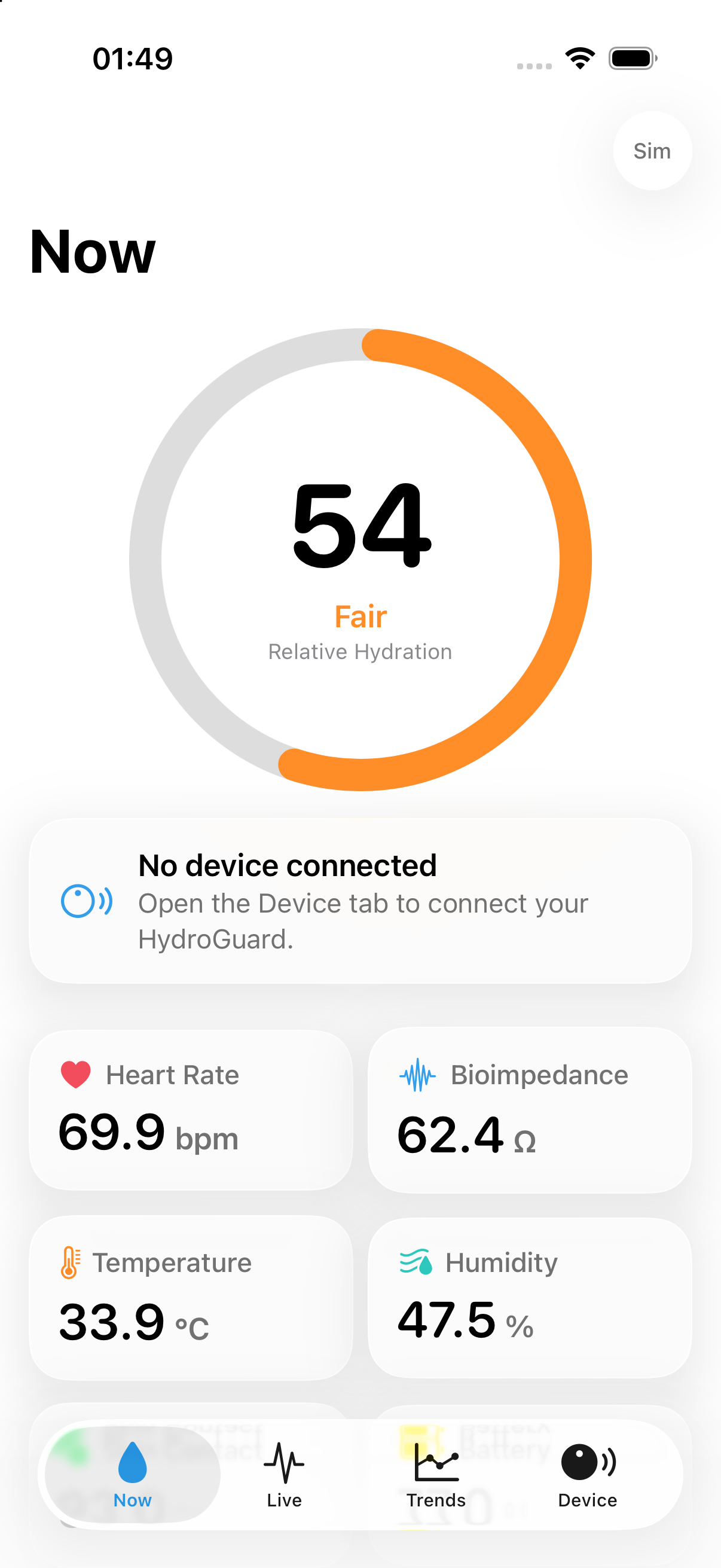
The screenshot above comes from a simulator, not a board. An iPhone simulator has no Bluetooth, so the app is running on a recorded session instead. The app says so itself. The small “Sim” label in the corner appears whenever the data it is showing is simulated, which is the same mechanism the mocked temperature record uses.